



On a Sunday in March, a young couple lingered by the coffee table after the second service. They were new, and somewhere in the small talk one of them mentioned a hard month. A greeter, kind as ever, said the thing everyone says. We should give them a call this week. Three people nodded. Then the week happened, the way weeks do, and by the time anyone thought of it again the couple had not come back.
Care has a habit of living in fragile places. A sticky note curling off the monitor. A name you carry in your head on the drive home, certain you will remember it, a little less certain by dinner. The family that visited three weeks ago never got their call, because everyone assumed someone else had it and nobody knew whose turn it was.
Follow-ups gives your whole care team one shared queue. First-time visitors, missed check-ins, and the quiet "someone should really reach out" moments all land in the same place, where anyone can see what is open, who has it, and when it is due.
Open the page and five tabs sit across the top: Unassigned, Assigned to me, Overdue, All open, and Completed. You can start your morning in Assigned to me and know exactly who is waiting on you. When you have room for one more, wander over to Unassigned and pick something up. Overdue keeps a gentle eye on the calls that have waited too long, so they stop sliding past you. Each card carries the person, the reason, and the due date, so choosing your next call takes seconds.
The moment a need comes up, you can catch it. A visitor mentions a rough week on the way out the door, and before you lose the thread you start a follow-up, choose the person, and write down why. You can begin one from the Follow-ups page, from a person's row menu, or right on their profile. Hand it to a teammate with a quick assign, or keep it for yourself. Pick when it is due so nothing drifts. If plans change, reassign it, and every detail stays tied to the person it is about, so whoever picks it up sees the whole story.
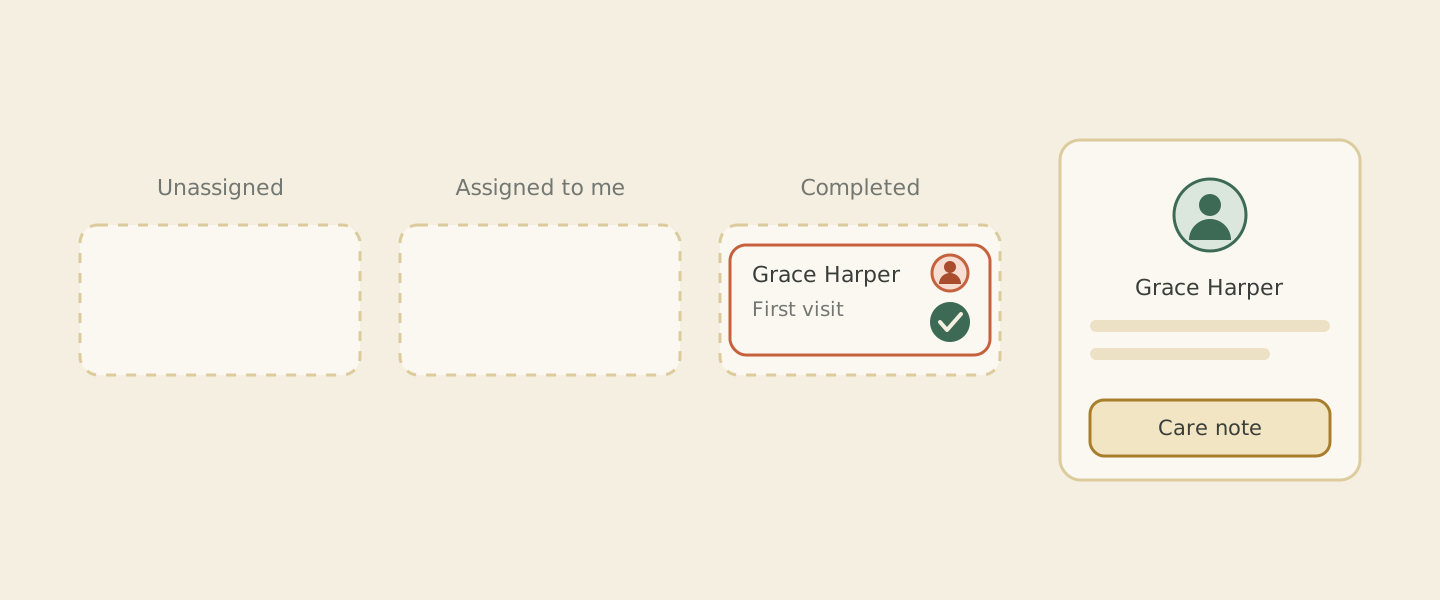 A follow up card moves from Unassigned to Assigned to me to Completed, and a care note settles onto the person's record.
Then the call actually happens. You mark the follow-up complete, and Cendance asks you for one small thing first: a short care note. You write how it went, a sentence or two, and that note lands straight on the person's record. Months from now, whoever opens that profile will find the story so far waiting for them, and they can pick up the conversation already knowing what came before.
Your sticky notes, meanwhile, are free at last for their true calling: labeling leftovers in the church fridge.
The gentlest part is how much of this fills in on its own. When a first-time visitor checks in, or someone misses a stretch of services, those flows can open a follow-up for you and drop it in Unassigned, where the whole team can see it. Nobody quietly slips through the cracks while everyone is busy on a Sunday morning. You can tune the buckets, the timing, and the reminders for each church and campus, so the queue matches the way your team already works. And on the afternoon a tab finally runs empty, let yourself take the win. That is a lovely thing to see on a Friday.
You will find Follow-ups under People & Care in your Cendance dashboard. Open it this week, pick up something unassigned, and log a follow-up for the person who has been on your heart today.


